

When something goes wrong
Connecting and installing
Section titled “Connecting and installing”| What you see | What to do |
|---|---|
| The “Recording browser / My browser” switch is missing | You are not in Chrome. Open Autest in Chrome |
| “Autest Recorder not found” | The extension is missing or disabled. Check it is on at chrome://extensions. This also appears in browsers other than Chrome |
| “Could not reach the extension. Check that it is installed” | Same as above |
| “The extension did not respond” | Restart Chrome |
| “Connection ended” | You connected from another computer, disconnected yourself, or 90 days passed. Choose Connect extension again |
| “Cannot reach Autest” | Check that you are online, and whether you need to be on the VPN |
| “The extension is connected as ○○@…. Reconnect” | It is connected with a different account. Choose Reconnect with this account |
Recording will not start
Section titled “Recording will not start”| What you see | What to do |
|---|---|
| “Running in Incognito is not allowed” or no window opens | Follow Allow it in Incognito |
| Start recording is disabled | The extension is not connected. Choose Connect extension first |
| “Enter a URL starting with https://” | Enter the URL starting with https:// |
| “That URL cannot be recorded” | Only https:// and http:// pages can be recorded |
| “The extension is holding another recording. Open it and stop” | Stop the previous recording from the Autest icon at the top right of Chrome |
| “Another recording is in progress” | Choose Stop the recording in progress |
| “The limit on concurrent recordings has been reached” | Your organisation is at its limit. Wait for someone else’s recording to finish |
The recording is not saved
Section titled “The recording is not saved”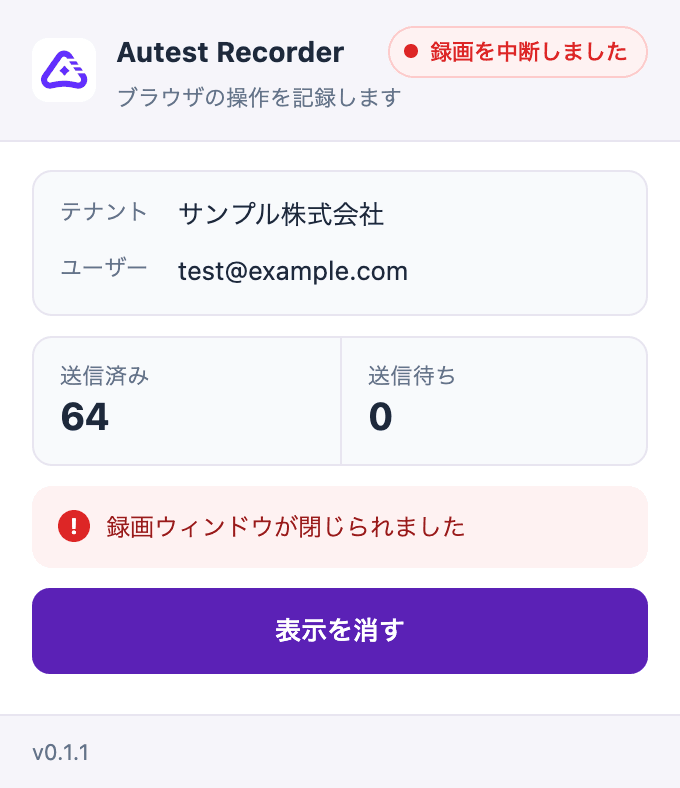
| What you see | What to do |
|---|---|
| “Could not save the recording” | Choose Back to recording and stop again. If it still fails the recording is not saved; record again |
| The popup says “Recording interrupted” | Nothing was saved. Check the reason shown and record again |
| “The recording was too large to save” | You passed the 64 MB limit for one recording. Split the scenario and record again |
| “The unsent backlog passed its limit” | The connection was unstable. Check your network and record again |
| You recorded but the actions are missing | You may have used a page that opened in a new tab. Only the first tab is recorded |
| The recording disappeared after being left alone | A 3-minute gap in the connection loses the recording. Check that your computer did not sleep |
If this does not help
Section titled “If this does not help”Contact us with:
- The message shown in Autest
- What the Autest icon at the top right of Chrome showed
- The URL you were trying to record
- The date and time